Hotline: 1-866-986-BYOD
MDM Implementation Whitepaper
Satish Shetty, February 2nd 2023, sat@codeproof.com

MDM Implementation
Implementing an MDM solution in a business environment requires proper planning and dedication. The software streamlines device setup and provisioning, including bulk loading of applications and configurations, as well as ongoing updates and maintenance. To ensure a successful deployment, it is advisable to implement the MDM software at the time of purchasing new devices. Businesses should choose an MDM vendor that can cater to their specific requirements and supports their business needs. In the US, smartphones and tablets are commonly sold through mobile carriers, who work with various MDM software providers. It's crucial for businesses to choose a robust and reliable MDM vendor that aligns with their needs. The device platform also plays a crucial role in choosing the right MDM solution. For instance, some platforms may have specific capabilities or limitations that the business needs to consider. In conclusion, businesses should consider both the device platform and MDM vendor when selecting an MDM solution to ensure they meet their business requirements and goals.
Difference between Android and iOS MDM
Android phones and tablets now come equipped with the Android Enterprise framework, which offers comprehensive enterprise mobility management APIs and prioritizes data leakage prevention (DLP). During device provisioning, the MDM software transforms the consumer Android device into a business-ready device.
Apple devices can be provisioned with Mobile Device Management (MDM) software through the Apple Business Manager (ABM) portal. The ABM portal verifies device ownership and offers complete remote management capabilities. To use ABM, organizations must sign up on the portal, purchase iPhones or iPads and wait for about a week for the ABM organization ID to be activated. Devices purchased through ABM are shipped ready for MDM zero-touch enrollment and are fully configurable remotely in a supervised state. For legacy iOS devices, they must be assigned to ABM through the Apple Configurator app on a MacOS computer. However, as of iOS 16, the app is also available on iPhones.
The ABM process allows for over-the-air MDM profile installation without the need for physical device access. Once the device is powered on and connected to a Wi-Fi or cellular network, it automatically connects to the ABM server and downloads and installs the MDM profile. The end user cannot disable or prevent the MDM installation. This process is similar to the Android Zero Touch enrollment or KNOX mobile enrollment for Samsung devices. Typically, an MDM will block a soft factory reset, but will still be reinstalled on the device even after a hard factory reset.
iOS devices are provisioned with MDM software by installing an MDM profile (plist XML file), which communicates with the MDM server through the built-in iOS MDM client to enforce policies. In contrast, Android devices typically require the installation of an MDM app, which communicates with the MDM server to receive and enforce configurations on the device.
Understanding available provisioning methods
| Company Owned | Android Enterprise QR code | Factory reset is required, enabling full management |
| Android Zero Touch | Factory reset is required, enabling full management | |
| KNOX Mobile Enrollment (KME) | Factory reset is required, enabling full management | |
| Apple Business Manager (ABM) | Factory reset is required, enabling supervision and full management | |
| Apple Configurator | Factory reset is required, assigning the device to ABM and enabling supervision and full management | |
| BYOD | Android App (APK) based Enrollment | Creates a workspace container in the Android Device. In the BYOD scenario, device control is more limited. |
| iOS Profile Install through Safari | Installs an MDM profile in the device for BYOD providing limited controls. |
Understanding Different Provisioning Profiles in Enterprise Mobility Management
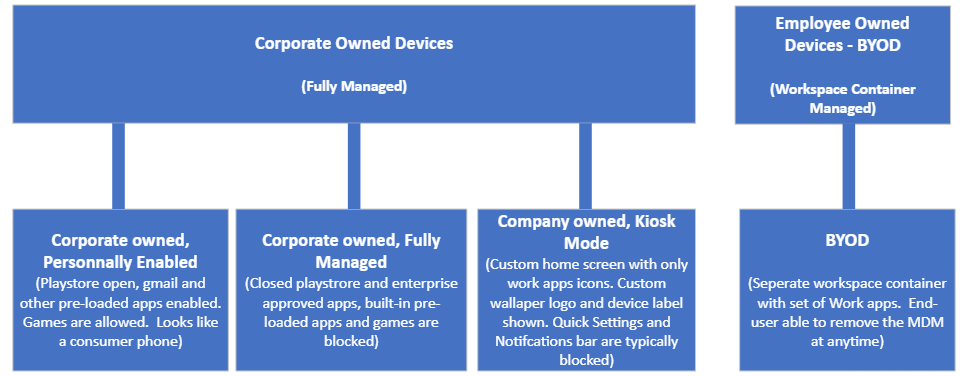
Company Owned, Personally Enabled (COPE): In this scenario, company-owned devices are issued to employees for both personal and work use. The device is fully managed by the company's IT administrator, but employees can use their personal Gmail or Apple iTunes accounts to download public apps. They can also keep personal contacts and photos in the primary device profile. Some MDM solutions allow for a separate work profile container on the device to house and manage business apps. The device is trackable and can be remotely wiped by the IT administrator, and the end-user cannot disable MDM control.
Company Owned, Fully Managed: Devices in this category are used solely for work purposes and all apps are managed and updated by the IT administrator. End-users can only install enterprise-approved apps and cannot download external apps. Pre-loaded apps are blocked during provisioning, and the home screen has a company-specified wallpaper or logo. The Settings app is enabled but with limited capabilities, and the end-user cannot remove the apps or disable MDM control.
Company Owned, Kiosk Enabled: Devices in this configuration are highly restricted, with only whitelisted apps available, and buttons and notifications blocked. All OEM pre-loaded apps are erased, making it ideal for use in retail, hospitality, digital signage, and other industries. On Android devices, this requires enabling lock task mode or using a custom home launcher app. On iOS devices, single app mode can be enabled through MDM, running in full-screen mode and potentially restricting touch control, buttons, speakers, camera, and microphones. If multiple app support is needed, it's recommended to use iOS restrictions to whitelist and blacklist apps on a supervised device.
Employee-Owned (BYOD): In the case of Android devices, there are two profiles: a primary profile for the user's personal information and apps, and a temporary workspace container created during enrollment for work-related apps and contacts. The IT administrator only has control over the workspace container and can enforce password requirements and wipe its contents, but has no control over the device's camera, settings, or accounts. Typically, the end-user installs the MDM app from the Play Store or as an APK package from an internal website, and the MDM app then creates the container and sets up the necessary profile. For iOS devices, there is no separate container, but instead, the MDM profile is installed and managed through the Settings app. The end-user can remove the MDM profile at any time from the Settings app. In both platforms, the enrollment process does not require a factory reset of the devices.
When selecting an MDM solution, it's important to consider the different provisioning profiles offered. These profiles determine the level of control and access to device features that can be exercised by the IT administrator. For example, a manager's profile might have a less restricted configuration compared to field employees who use the device for a specific purpose.
It's crucial to choose an MDM software that offers the provisioning methods and management features required by your organization. Switching from one MDM to another can be difficult, especially if thousands of devices have already been enrolled with the initial solution. To ensure you make the best decision, it's recommended to test each MDM with a few devices before making a final purchase.
Step-by-step MDM rollout plan
- Discovery and requirements (week 1-2): Inventory existing devices, OS versions, app catalog, and business processes. Identify ownership models needed (BYOD, COBO, COPE, COSU / kiosk). Map compliance frameworks (HIPAA, GDPR, SOC 2, ISO 27001, CJIS, FIPS 140-2). Define success metrics: enrollment time, support tickets, audit-readiness.
- Vendor selection (week 3-4): Run 5-10 device pilot per the MDM Buyer's Guide. Score against weighted requirements. Verify zero-touch flow with your actual carrier and OEMs.
- Architecture and policy design (week 5-6): Define group / profile hierarchy by role, location, and risk. Author baseline policies (encryption, passcode, OS minimum, Wi-Fi / VPN / certificates). Plan SSO integration (Okta, Azure AD / Entra ID, Google Workspace).
- Pre-staging (week 7-8): Register devices in Android Zero-Touch, Samsung KME, Apple Business Manager, and Windows Autopilot tenants. Bind enrollment profiles to device IDs / serials.
- Pilot deployment (week 9-10): Roll out to 5-10% of fleet. Validate enrollment, policy apply, app delivery, and support workflows. Collect issues and iterate.
- Phased production rollout (week 11-16): Expand in waves of 10-25% per week. Communicate to end users at each wave. Maintain a dedicated rollout support channel.
- BYOD program launch (week 13-18, parallel): Publish BYOD policy and privacy notice. Enable Android work profile and iOS User Enrollment. Distribute managed apps via Codeproof self-service catalog.
- Post-launch governance (ongoing): Weekly compliance reviews, monthly policy updates, quarterly OS version sweeps. Document change-control and incident-response procedures.
Common pitfalls and how to avoid them
- No factory reset before enrollment: Skipping a factory reset on used / refurbished devices often leads to incomplete management. Plan refurb workflows that include a reset before MDM provisioning.
- Missing APNs certificate renewal: Apple Push Notification service certificates expire yearly. Set calendar reminders 30 days ahead - if APNs expires, Apple MDM stops working until renewed.
- BYOD privacy confusion: Publish a clear privacy notice that explains what IT can and cannot see in the work profile / User Enrollment partition. Without this, end users resist enrollment.
- Over-restrictive baseline: Starting with the strictest possible policy generates a wave of support tickets. Begin with a permissive baseline and tighten progressively.
- No offboarding playbook: When an employee leaves, you need to know exactly which actions to run (selective wipe, license reassignment, certificate revocation). Document this before your first termination.
- Skipping the pilot: A pilot catches edge cases - specific OS versions, app conflicts, network issues - that would otherwise become production outages.
- Ignoring OEMConfig: Standard Android Enterprise covers OS-level policy but not OEM-specific hardware (Zebra scanners, Kyocera buttons, Samsung Knox). Plan OEMConfig deployment for rugged fleets.
Operational readiness checklist
Before declaring an MDM deployment "production", confirm each item below:
- SSO is configured and tested with at least three admin roles (Super Admin, Admin, Read-Only)
- Zero-touch enrollment is verified end-to-end on at least one device per OEM
- APNs certificate is registered, with a renewal calendar reminder
- BYOD privacy notice is published and acknowledged by enrolled users
- Baseline policies are version-controlled (export / import templates) for change management
- Compliance dashboards are mapped to your specific framework (HIPAA, SOC 2, etc.)
- Audit logs are exporting to your SIEM (Splunk, Sentinel, Sumo, Datadog)
- Lost / stolen device incident workflow is documented and rehearsed
- End-user enrollment guides exist for each ownership model and platform
- Support escalation path includes vendor-side SLA-backed contacts
Related resources
















"Throughout my experience with Codeproof, it has worked flawlessly. Even more importantly, Codeproof support is unrivaled."

Working with Codeproof has been a relief, it allows our company to have control over software and devices and visibility to ensure our employees have the proper equipment to do their job each and every day.

We didn’t make a single compromise to get the protection we wanted and needed.

We have site phones that we need locked and tracked. We have recovered lost or stolen phones...and pushed new apps remotely.

The Codeproof platform not only assists in fleet management, it has made retrieving company property far more reliable.
Customer support is always accessible, and the team consistently goes out of their way to ensure the MDM platform meets all of our needs.

Codeproof had the right balance of easy individual device configuration and group-level settings, as well as an excellent support team and willingness to add new features to meet our needs, all at a competitive price.

Having our employees work in remote locations, Codeproof has really helped us manage our devices...They are very helpful and detailed when explaining thing.

Codeproof has made device management much easier than some larger MDM solutions. From the beginning of our trial Console, up to the present, we were able to easily contact the development team at Codeproof with any ideas for improvements.

With Codeproof, the first thing I noticed is that the UI is much more intuitive and simpler to navigate. I feel like there are as many, if not more, features available to me in Code Proof but they are a little easier to find.

Foundation is so grateful for the partnership with Codeproof and their willingness to support students and families in need of literacy resources. While our technical needs are likely less than that of other companies, we have found great value in the Codeproof product.

Codeproof has great customer support. If there is an issue, or if we need assistance with anything, they are very quick to respond and lend a hand.

Terrapin Pharmacy’s Executive Management and Technology Developers would be extremely likely to recommend Codeproof to others based upon the interactions we have had with the Codeproof team and the can-do culture within their organization.

Codeproof is a very comprehensive MDM product. We received great service at all times from their technicians when we had issues. They are continually working on improving the product with feedback from customers like us, so we can have better control of our remote equipment.

[An] upbeat, well-organized, and helpful company. Codeproof provided superior customer support during a time of uncertainty.

Codeproof has been an asset in maintaining security, control and reducing liability of our mobile devices by allowing us blanketed control of our mobile fleet at all times regardless of day and location. It will continue to be the foundation for our mobile security for now and the future. Their security options and scalability is priceless.

I chose Codeproof over other players in the market because it's simple and customizable dashboard caters to the needs of my business. Codeproof tries to find solutions and treats you as partners rather than just a customer.

I chose Codeproof for our internal MDM solutions over other options because the case study and utilization of the system were very understandable. It decreased our potential costs related to device investments while increasing device security and reducing operational costs.