Hotline: 1-866-986-BYOD

Okta SSO for Codeproof MDM
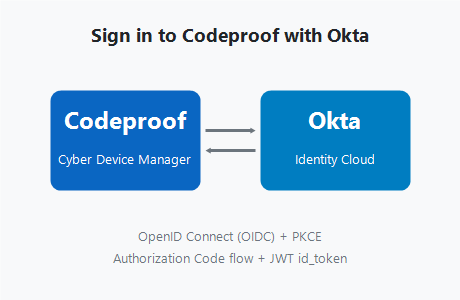
Sign in to Codeproof Cyber Device Manager with your existing Okta identity. The integration uses OpenID Connect (OIDC) with PKCE on the Authorization Code flow, supports Okta Workforce Identity Cloud and Customer Identity, and is included with every Codeproof plan at no extra cost.
Okta Integration Network listing in progress. Contact us if you want early access or a manual configuration walkthrough.
Why Okta + Codeproof?
- One identity, one sign-in: IT admins and end users access Codeproof using the same Okta credentials they already use for the rest of their SaaS stack.
- Centralized lifecycle: When an employee joins, moves teams, or leaves, the change happens once in Okta and propagates to Codeproof.
- Stronger security posture: Inherit your Okta MFA, conditional access, and risk policies on every Codeproof console login.
- Modern protocol: OIDC Authorization Code flow with PKCE, signed JWT id_tokens, and JWKS-rotated keys. No SAML XML to hand-edit.
- No extra Codeproof cost: SSO is included with every Codeproof tier. You pay Okta for your own seats; Codeproof is free of charge in the catalog.
How the integration works
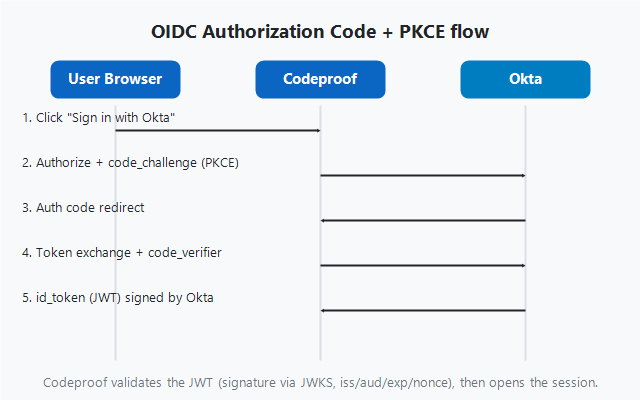
The Codeproof console is an OpenID Connect Relying Party. Okta is the OIDC Provider. When a user clicks "Sign in with Okta" in the Codeproof console:
- Codeproof redirects the browser to your Okta org's authorization endpoint with a PKCE code challenge.
- Okta authenticates the user (password, factor, conditional access).
- Okta redirects back to Codeproof with an authorization code.
- Codeproof exchanges the code at Okta's token endpoint and receives a signed id_token (JWT).
- Codeproof validates the JWT (signature, issuer, audience, expiry, nonce) and establishes the console session.
Configure Okta SSO for your tenant
A Codeproof tenant admin and an Okta admin together can finish setup in about 15 minutes.
- In Okta: Applications → Create App Integration → OIDC, Web Application. For the sign-in redirect URI, paste the value shown in your Codeproof console under Settings → SSO → Okta (the console renders the exact callback URL for your tenant so it stays correct as Codeproof rolls out console updates). Copy the resulting Client ID and Client Secret.
- In Codeproof: Settings → SSO → Add Okta. Paste your Okta org URL (for example
https://acme.okta.com), Client ID, and Client Secret. Codeproof stores credentials encrypted at rest. - Map roles (optional): Assign Okta groups to Codeproof admin / read-only / MSP roles so the right people land with the right permissions.
- Test sign-in: Click "Test SSO" in Codeproof. A new browser tab walks through the full Okta flow and reports any configuration errors.
- Roll out to users: Once tested, enable Okta SSO as the default sign-in for your Codeproof tenant. Password sign-in can stay enabled as a fallback or be disabled entirely.
Security model
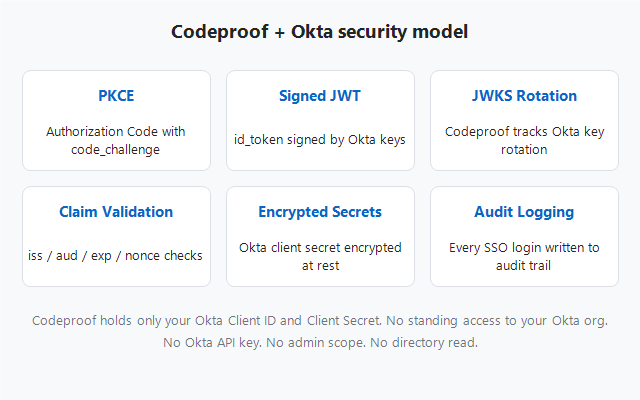
- PKCE on Authorization Code: Defends against authorization-code interception even if the redirect URI is reachable by an attacker.
- Signed JWT id_tokens: Codeproof verifies signatures against Okta's published JWKS at
/oauth2/v1/keysand rotates with Okta automatically. - Issuer, audience, expiry, nonce checks: Every claim is validated before the session is established.
- Encrypted credential storage: Customer Okta client secrets are stored encrypted at rest in the Codeproof tenant settings store.
- Audit logging: Every SSO sign-in writes to the Codeproof audit log alongside its source IP, user agent, and Okta session reference.
- No standing access to your Okta org: Codeproof holds only the Client ID and Client Secret you provision. There is no Okta API key, no admin scope, and no read access to your Okta directory.
Use cases
IT and security teams
Single sign-on to the Codeproof console for admins and helpdesk. Enforce Okta MFA and conditional access on every sign-in. No separate password vault for Codeproof.
Managed service providers (MSPs)
SSO into each customer tenant through your MSP Okta org. Centralized off-boarding when a technician leaves. Pairs with the Codeproof MSP portal for multi-tenant access.
Regulated industries
Compliance frameworks (SOC 2, HIPAA, CJIS, ISO 27001) increasingly require federated identity for privileged admin tools. Codeproof + Okta satisfies that control out of the box.
Large enterprises
Lifecycle automation from Okta: when an admin moves teams, Okta group changes route to the right Codeproof role automatically. Pair with the UEM platform for full endpoint and identity coverage.
Okta SSO FAQs
Is the Codeproof + Okta integration SAML or OIDC based?
Do I need to pay Okta or Codeproof extra for SSO?
Is Codeproof in the Okta Integration Network (OIN)?
What Okta editions are supported?
Does Codeproof support SCIM provisioning from Okta?
What if Codeproof sign-in is needed when Okta is down?
Where does Codeproof store the Okta client secret?
Does the integration work for MSPs managing multiple Codeproof tenants?
Can I require MFA on every Codeproof sign-in via Okta?
Ready to roll out Codeproof + Okta?
Start a free 14-day trial of Codeproof Cyber Device Manager and wire up Okta SSO in about 15 minutes. No credit card required. Onboarding is free and led by Codeproof engineers.
Start free trial Request a demo
















"Throughout my experience with Codeproof, it has worked flawlessly. Even more importantly, Codeproof support is unrivaled."

Working with Codeproof has been a relief, it allows our company to have control over software and devices and visibility to ensure our employees have the proper equipment to do their job each and every day.

We didn’t make a single compromise to get the protection we wanted and needed.

We have site phones that we need locked and tracked. We have recovered lost or stolen phones...and pushed new apps remotely.

The Codeproof platform not only assists in fleet management, it has made retrieving company property far more reliable.
Customer support is always accessible, and the team consistently goes out of their way to ensure the MDM platform meets all of our needs.

Codeproof had the right balance of easy individual device configuration and group-level settings, as well as an excellent support team and willingness to add new features to meet our needs, all at a competitive price.

Having our employees work in remote locations, Codeproof has really helped us manage our devices...They are very helpful and detailed when explaining thing.

Codeproof has made device management much easier than some larger MDM solutions. From the beginning of our trial Console, up to the present, we were able to easily contact the development team at Codeproof with any ideas for improvements.

With Codeproof, the first thing I noticed is that the UI is much more intuitive and simpler to navigate. I feel like there are as many, if not more, features available to me in Code Proof but they are a little easier to find.

Foundation is so grateful for the partnership with Codeproof and their willingness to support students and families in need of literacy resources. While our technical needs are likely less than that of other companies, we have found great value in the Codeproof product.

Codeproof has great customer support. If there is an issue, or if we need assistance with anything, they are very quick to respond and lend a hand.

Terrapin Pharmacy’s Executive Management and Technology Developers would be extremely likely to recommend Codeproof to others based upon the interactions we have had with the Codeproof team and the can-do culture within their organization.

Codeproof is a very comprehensive MDM product. We received great service at all times from their technicians when we had issues. They are continually working on improving the product with feedback from customers like us, so we can have better control of our remote equipment.

[An] upbeat, well-organized, and helpful company. Codeproof provided superior customer support during a time of uncertainty.

Codeproof has been an asset in maintaining security, control and reducing liability of our mobile devices by allowing us blanketed control of our mobile fleet at all times regardless of day and location. It will continue to be the foundation for our mobile security for now and the future. Their security options and scalability is priceless.

I chose Codeproof over other players in the market because it's simple and customizable dashboard caters to the needs of my business. Codeproof tries to find solutions and treats you as partners rather than just a customer.

I chose Codeproof for our internal MDM solutions over other options because the case study and utilization of the system were very understandable. It decreased our potential costs related to device investments while increasing device security and reducing operational costs.