Hotline: 1-866-986-BYOD
Windows Kiosk Solution
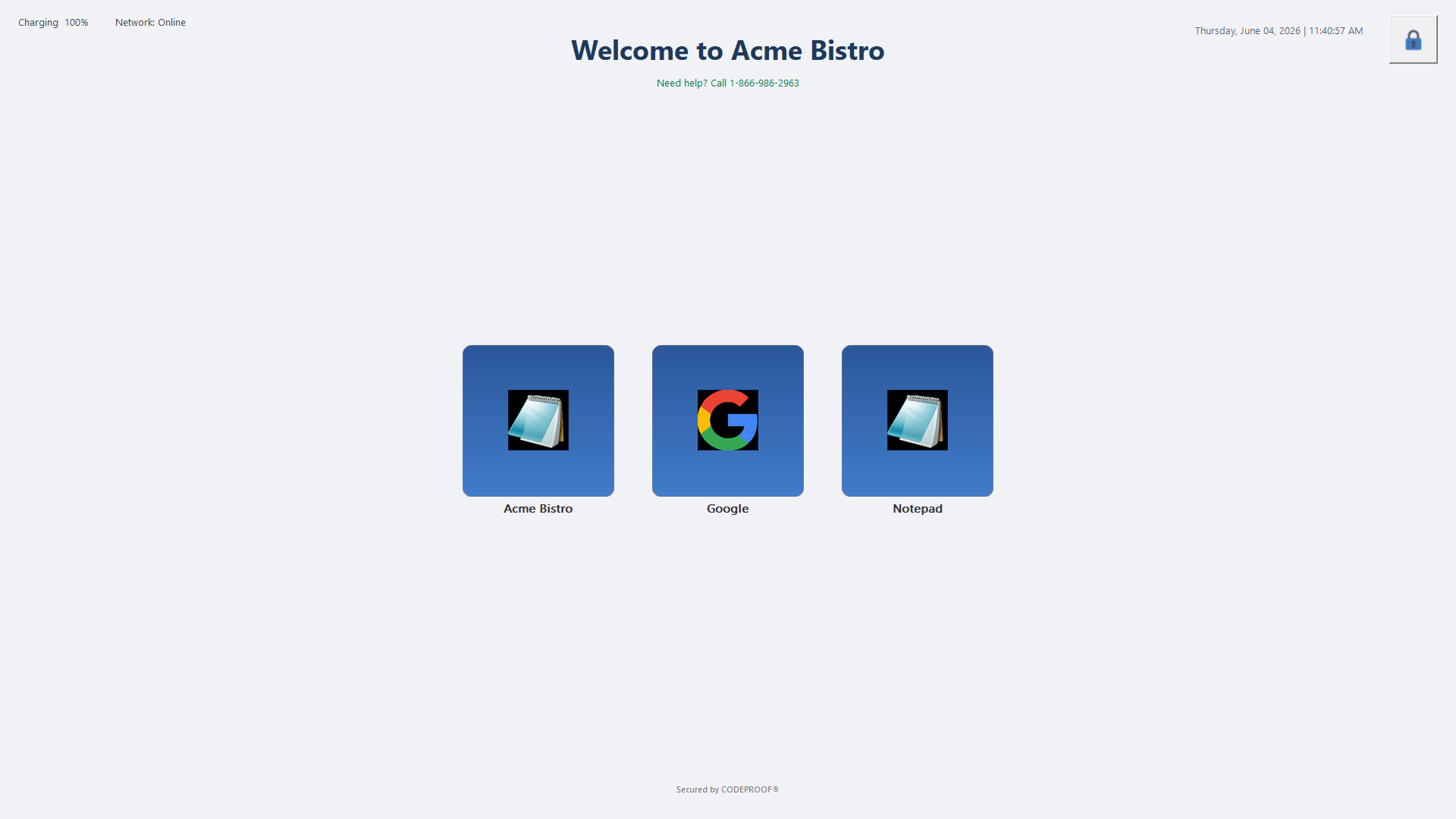
Lock a Windows 10 or Windows 11 device into one approved app, or a small curated set, and ship it ready to work. Built for self-order restaurant kiosks, retail POS, hotel check-in, clinic check-in, manufacturing floor terminals, and digital signage. Codeproof handles single-app and multi-app lockdown, auto-launch on boot, exit-PIN, scheduled lock/unlock, and watchdog recovery so the device always comes back to the right screen.
Why run Windows in kiosk mode?
- One device, one job: Customers and staff cannot exit the app, browse the file system, install software, or hit the Start menu.
- Predictable customer experience: The screen always boots into the same UI. No drifting backgrounds, no popup notifications, no "press CTRL-ALT-DEL to log in" surprises.
- Reduced support load: Locked-down devices generate orders of magnitude fewer tickets than open desktops. Field techs deploy and walk away.
- PCI and HIPAA posture: A single-purpose terminal has a far smaller attack surface than a general-purpose PC. Easier scoping for audits.
- Hardware reuse: Repurpose existing Windows laptops, mini-PCs, or all-in-one terminals into purpose-built kiosks without buying specialized hardware.
- Brand control: Your splash screen, your app icons, your support number. The OS disappears into the background.
Codeproof Windows kiosk capabilities
- Desktop apps, modern apps, and web links: Lock the device to a Win32 desktop app, a UWP / MSIX modern app, or a web URL via a managed Chromium browser kiosk — single-app or any curated mix of the three.
- Multi-app mode: A curated launcher with a small set of approved apps (for example: POS app + a browser pinned to your web app + a calculator) and per-app permissions.
- Dedicated kiosk user account + auto-login: Codeproof provisions a separate local Windows user account for the kiosk role. That account signs in automatically on boot, isolating kiosk activity from any admin/operator account on the device and never exposing the desktop, Start menu, or file system to the customer.
- Enable / disable kiosk remotely: Switch a device in or out of kiosk mode from the Codeproof Dashboard. No on-site visit required.
- Background Windows + app updates while the kiosk runs: Codeproof MDM applies Windows quality/security patches and your kiosk app's own updates in the background while the device is in use. The customer-facing screen stays up — no visible reboot loops, no "your PC needs an update" prompts.
- Hardened, industry-aligned security: Works with BitLocker, Defender baselines, AppLocker / WDAC application allow-listing, and Microsoft's signed kiosk-mode primitives. Deployment posture aligns with CIS / NIST hardening guidance and supports PCI, HIPAA, and CJIS audit controls.
- Custom kiosk shell: The Codeproof launcher replaces Explorer, removing the taskbar, Start menu, file dialogs, and browser chrome.
- Exit-PIN protection: A configurable PIN lets staff temporarily exit the kiosk for maintenance, then returns the device to its locked state on a timer or sign-out.
- Watchdog recovery: If the kiosk app crashes or is killed, the Codeproof Agent relaunches it within seconds so customers never see a broken screen.
- Scheduled lock/unlock: Open the kiosk to staff at 7 AM, lock down at 7 PM, on a per-device or per-store schedule.
- Remote relaunch & restart: Recover a stuck kiosk from the Codeproof console without dispatching a technician.
- Branded splash screen: Configurable logo, welcome text, and support phone number — what your customer sees first.
How it works
Codeproof Windows kiosk is built on the same signed MSI that runs every Codeproof-managed Windows endpoint. There is no separate "kiosk product" to license or install. You enroll the device once, target it into a kiosk profile, and the device transitions to the locked shell on the next sign-in. Two layers do the work:
- Native Windows MDM applies the OS-level policies (sign-in restrictions, removable storage controls, network locks, Defender baselines) through the protocol Microsoft ships with Windows.
- Codeproof Agent runs the custom shell, owns the app launcher, enforces the exit-PIN, watches the kiosk process for crashes, and reports telemetry (uptime, last user action, network status, battery level) back to the cloud console.
Together they cover what native Windows Assigned Access cannot: cross-fleet config management, remote recovery, off-hours scheduling, and the visibility IT needs to manage hundreds of terminals across multiple stores from one screen.
Codeproof vs native Windows Assigned Access
Windows ships with a built-in feature called Assigned Access that can lock a local account into a single UWP app. It works on the device itself. Codeproof extends that model with everything you need to run a fleet of kiosks across stores from a single console.
| Capability | Native Assigned Access | Codeproof Windows Kiosk |
|---|---|---|
| Single-app lockdown | Yes (UWP only by default) | Yes — UWP, Win32, browser, or custom |
| Multi-app curated launcher | Limited, per-device XML config | Yes, managed centrally |
| Remote provisioning at scale | No — set up per device | Yes — push to a group from the console |
| Auto-launch on boot | Yes | Yes |
| Watchdog / auto-relaunch on crash | No | Yes |
| Exit-PIN for maintenance | No (requires admin sign-in) | Yes, configurable per profile |
| Scheduled lock/unlock windows | No | Yes |
| Remote relaunch / restart | No | Yes |
| Cross-fleet inventory and health | No | Yes |
| Branded splash + support number | No | Yes |
Set up a Windows kiosk in five steps
A field tech can convert an off-the-shelf Windows mini-PC into a deployed kiosk in about 15 minutes.
- Install the Codeproof MSI on the Windows device (Windows 10 1809+ or Windows 11). One signed installer; no separate kiosk product.
- Enroll the device into your Codeproof tenant (per-user, per-device, or via Autopilot for zero-touch).
- Create a kiosk profile in the console: choose single-app or multi-app, pick the apps, set the exit-PIN, configure the splash screen and support phone.
- Assign the profile to a device group (a single device, a store, or all stores in a region).
- Reboot or sign out. The device boots straight into the kiosk shell. Customers can use it; staff have an exit-PIN for maintenance.
Updates to the kiosk profile (new menu, new branding, new schedule) push to every assigned device within minutes. No store visits required.
Use cases by industry
Restaurant self-order kiosks
Lock a counter-top Windows tablet into your POS or self-order app. Auto-relaunch keeps the line moving when an app hangs. Branded splash with your restaurant name and a Codeproof-managed support number.
Retail POS terminals
Convert Windows-based registers into purpose-built point-of-sale terminals. Smaller attack surface for PCI scoping, no employee web browsing, no off-policy software installs. Pairs with Codeproof retail MDM.
Hotel check-in & concierge
Front-desk kiosks lock to your check-in app. Concierge tablets in the lobby lock to a branded web app. Scheduled lock/unlock for staff vs guest hours.
Healthcare check-in
Clinic and hospital lobby Windows tablets lock into HIPAA-compliant patient check-in. Idle timeouts auto-reset the form to protect the next patient's data. See MDM for Healthcare.
Manufacturing floor terminals
Shop-floor Windows boxes lock to MES / work-instruction / quality-tracking apps. Watchdog recovery keeps production lines moving when an app crashes.
Digital signage & wayfinding
Lock a Chromium browser to a signage URL or HTML5 player. Scheduled content rotations, automatic refresh, remote-restart for stuck screens.
Windows Kiosk FAQs
What Windows versions are supported?
Can I lock the device to a Win32 app, or only UWP?
What happens if the kiosk app crashes?
How does a staff member exit the kiosk for maintenance?
Can the kiosk schedule itself open during business hours and lock after close?
Can I use my existing Windows hardware?
How is this licensed?
Does the kiosk work without internet?
Ready to lock down your Windows fleet?
Convert any Windows 10 or 11 device into a single-purpose kiosk in about 15 minutes. Free 14-day trial, no credit card required, onboarding led by Codeproof engineers.
Start free trial Request a demo













"Throughout my experience with Codeproof, it has worked flawlessly. Even more importantly, Codeproof support is unrivaled."

Working with Codeproof has been a relief, it allows our company to have control over software and devices and visibility to ensure our employees have the proper equipment to do their job each and every day.

We didn’t make a single compromise to get the protection we wanted and needed.

We have site phones that we need locked and tracked. We have recovered lost or stolen phones...and pushed new apps remotely.

The Codeproof platform not only assists in fleet management, it has made retrieving company property far more reliable.
Customer support is always accessible, and the team consistently goes out of their way to ensure the MDM platform meets all of our needs.

Codeproof had the right balance of easy individual device configuration and group-level settings, as well as an excellent support team and willingness to add new features to meet our needs, all at a competitive price.

Having our employees work in remote locations, Codeproof has really helped us manage our devices...They are very helpful and detailed when explaining thing.

Codeproof has made device management much easier than some larger MDM solutions. From the beginning of our trial Console, up to the present, we were able to easily contact the development team at Codeproof with any ideas for improvements.

With Codeproof, the first thing I noticed is that the UI is much more intuitive and simpler to navigate. I feel like there are as many, if not more, features available to me in Code Proof but they are a little easier to find.

Foundation is so grateful for the partnership with Codeproof and their willingness to support students and families in need of literacy resources. While our technical needs are likely less than that of other companies, we have found great value in the Codeproof product.

Codeproof has great customer support. If there is an issue, or if we need assistance with anything, they are very quick to respond and lend a hand.

Terrapin Pharmacy’s Executive Management and Technology Developers would be extremely likely to recommend Codeproof to others based upon the interactions we have had with the Codeproof team and the can-do culture within their organization.

Codeproof is a very comprehensive MDM product. We received great service at all times from their technicians when we had issues. They are continually working on improving the product with feedback from customers like us, so we can have better control of our remote equipment.

[An] upbeat, well-organized, and helpful company. Codeproof provided superior customer support during a time of uncertainty.

Codeproof has been an asset in maintaining security, control and reducing liability of our mobile devices by allowing us blanketed control of our mobile fleet at all times regardless of day and location. It will continue to be the foundation for our mobile security for now and the future. Their security options and scalability is priceless.

I chose Codeproof over other players in the market because it's simple and customizable dashboard caters to the needs of my business. Codeproof tries to find solutions and treats you as partners rather than just a customer.

I chose Codeproof for our internal MDM solutions over other options because the case study and utilization of the system were very understandable. It decreased our potential costs related to device investments while increasing device security and reducing operational costs.